For Florida FES-UA & FES-EO Families

FES-UA & FES-EO
Reimbursement Help for Florida Families.

SunshineClaimBuddy helps Florida scholarship families prepare receipts, proof of payment, pre-authorization letters, and Step Up For Students portal details before a claim goes on hold for missing documentation.

Independent tool · Not affiliated with SUFS or Step Up For Students

Reimbursement Prep

What SunshineClaimBuddy helps with

Use the app before you submit so common Step Up For Students reimbursement and EMA portal issues are easier to catch and fix.

Official references: Step Up proof-of-payment FAQ and Step Up purchasing guides. SunshineClaimBuddy is independent and does not guarantee approval.

Built by a parent who lived this.

I'm a Florida dad with a son who has Down syndrome. For years, I watched reimbursement requests get delayed or denied over small document details — a missing license number, a mismatched date, or a category that did not fit. I believed AI could help flag some of these issues before submission. I also got tired of digging through photos, emails, and paper piles just to find every receipt for one request. So I built SunshineClaimBuddy to help families like mine prepare a clearer packet.

See how it works →

Sound familiar?

📬

"Your claim is On Hold for missing documentation."

🔍

Digging through the online handbook to figure out why it was denied.

Waiting weeks for a response only to find a simple fix was needed.

📸

Scanning a receipt on your phone but worried about SSNs or bank numbers visible in the background.

✍️

Writing a pre-authorization letter from scratch, unsure of the right category or what policy to cite.

See it in action

Real screens from the app — no mock-ups.

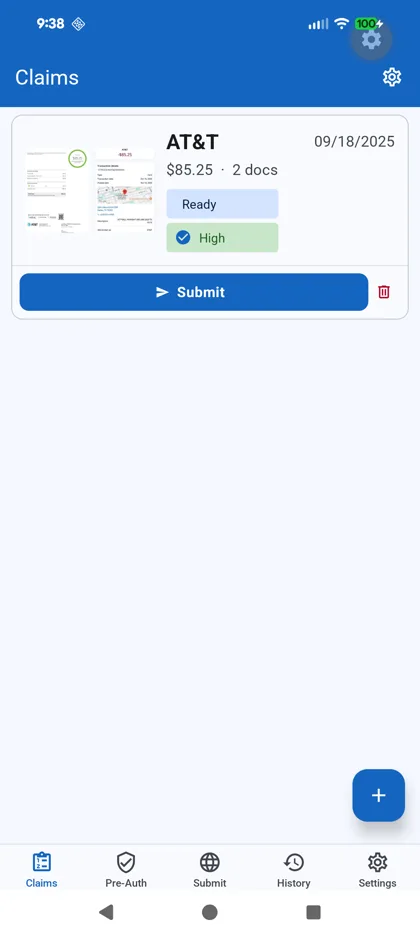
Claims list — Ready status and High approval likelihood

Claims at a glance
See every claim's status and approval likelihood in one place.

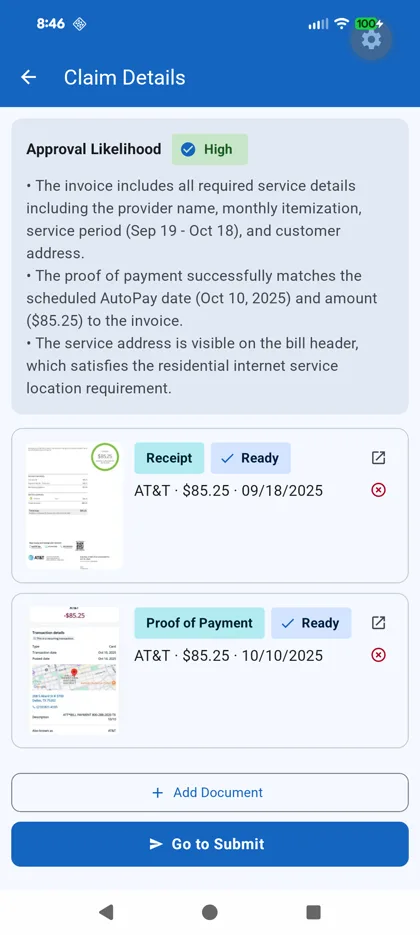
Claim detail — AI approval likelihood High with compliance reasons

AI compliance review
Possible document and rule issues flagged for your review before you submit.

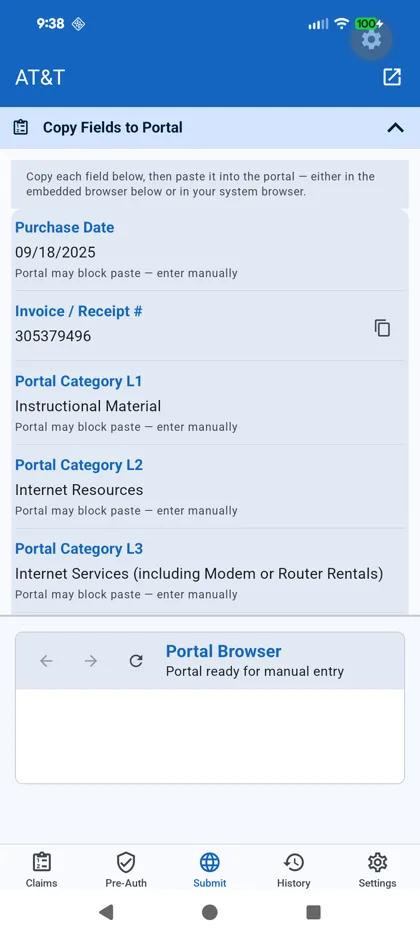
Submission workspace with copyable portal category fields

Submission workspace
A prominent shortcut takes you to every prepared portal field for one-tap copying.

Everything you need to submit with confidence

SunshineClaimBuddy reviews document details together and flags possible gaps for you to verify before opening the portal.

Claim Submission Workflow

Scan → AI compliance review → suggested category & draft justification → approval likelihood score → choose phone or desktop submission. On your phone, Step Up opens only in the normal browser; for desktop, email the fields and separate upload files to yourself.

See the full walkthrough →

Compliance Check

AI compares extracted document text with bundled FES-UA or FES-EO reference guidance and flags possible issues such as prohibited items, frequency limits, and provider requirements. Always verify current official rules.

Missing License Detector

Some service categories require provider credentials, license details, or other supporting evidence. The app flags likely missing details for you to compare with the selected category's current requirements.

Category Advisor

Get a suggested 3-level portal category path (L1 → L2 → L3) with a confidence rating and plain-English reasoning, then verify it in EMA.

PII Scanner & Redaction

Sensitive patterns such as credit card numbers, SSNs, and bank accounts are flagged locally for your review. You choose what to permanently redact in-app before AI analysis.

Approval Likelihood Score

AI scores every claim High / Medium / Low with key reasons — "Amount matches POP ✓, Pre-authorization may be required ⚠".

Pre-Authorization Assistant

Open a supported public product or service page and tap one button. AI reads the available page content, identifies likely item details, suggests a portal category, and drafts authorization text for you to review.

See how it works →

Appeal Letter Generator

Got a denial? AI drafts appeal language using your item details and relevant reference material for you to verify, edit, and use in the one-time EMA appeal workflow.

Pre-Authorization Made Easy

From Google search to pre-auth letter in seconds.

Buying something that may need pre-approval from Step Up? SunshineClaimBuddy reads available public page content and drafts a request for you to verify and edit.

1

Search like you normally would

Type a product name or paste a URL into the built-in browser, then open a supported public product or service page with enough visible detail for review.

2

Land on the product page & tap one button

Navigate from the search results to the actual item page. Once you're there, tap "Pre-Auth This Item" — that's it. No copying, no forms.

3

AI reads the page & categorizes the item

Gemini AI reads available content from the public page, extracts likely item details, and suggests an FES-UA or FES-EO portal category path (L1 → L2 → L3) for you to verify.

4

Get an eligibility summary & authorization draft

You receive a short eligibility summary and draft authorization text using the scholarship, item, price, and relevant reference material. Review it against the current official rules, edit as needed, and copy when ready.

5

Choose phone or desktop submission

Open Step Up in your device's normal browser and return to the app's highlighted Portal Fields shortcut to copy each prepared field, or email the English details and separate upload files to yourself for desktop submission. SunshineClaimBuddy never asks for, reads, or stores your Step Up credentials or portal session.

What used to take 30 minutes now takes 30 seconds. No handbook digging. No letter templates. No guessing which category.
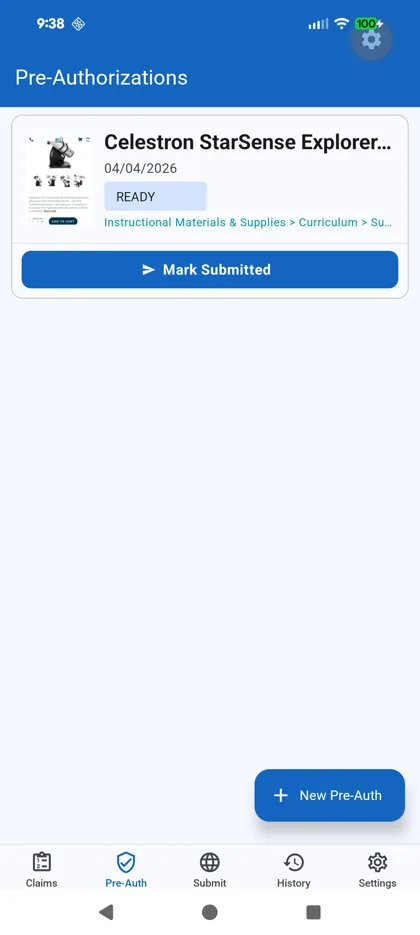
Pre-Auth list — Celestron telescope, READY, category auto-identified

Pre-Auth List
Item details and a category suggestion organized for your review.

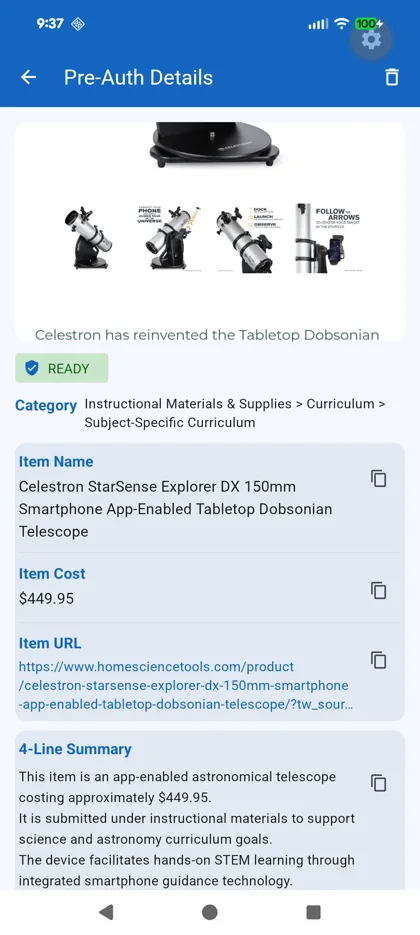
Pre-Auth details — item name, cost, category, and 4-line summary

AI Details
Likely item details, suggested category, and eligibility summary for your review.

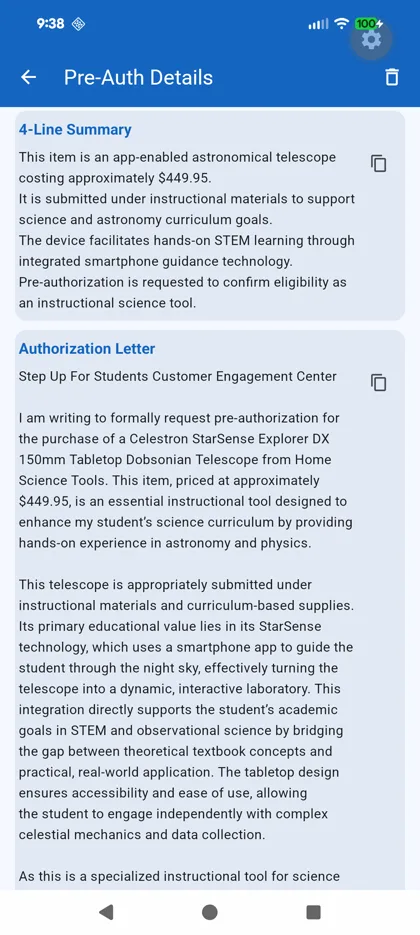
Pre-auth authorization letter draft ready for review

Authorization Draft
AI-written draft to verify and edit before copying into EMA.

Claim Submission, Simplified

Stop guessing. Stop getting denied.

SunshineClaimBuddy guides the preparation workflow from scanning a receipt to copying prepared fields, while you verify the packet and control the final submission in EMA.

1

Collect documents your way

Snap a photo with the in-app scanner, or share directly from Photos, email, or any file app. Receipts, invoices, and proof-of-payment screenshots are all automatically ingested — no manual data entry.

2

PII flagged locally for your review and redaction

On-device ML extracts text — no images sent to the cloud. Then local PII scanning flags credit card numbers, SSNs, and bank accounts before a single byte is transmitted. One tap permanently redacts anything sensitive.

3

AI reviews every document against FES rules

The AI reviews extracted text from your receipt, invoice, and proof documents together using bundled FES reference guidance. It flags possible prohibited items, missing credentials, date or amount mismatches, and frequency-limit concerns for you to verify before submitting.

4

Get a suggested portal category & draft justification

The AI suggests a 3-level category path (L1 → L2 → L3) with a confidence rating and reasoning. It also drafts a justification paragraph for you to verify and edit before copying into the portal.

5

See your approval likelihood before you open the portal

Every claim receives a High, Medium, or Low estimate with specific callouts. Use it to review possible issues; it is not an approval guarantee.

6

Submit by phone or send to a computer

Open Step Up in your normal browser and return to the highlighted Portal Fields shortcut, or email the English portal details and separate upload files to yourself for a desktop submission. SunshineClaimBuddy cannot access the portal page, cookies, credentials, or session. You control every sign-in, upload, and submission.

🎯
An On Hold reimbursement can be automatically denied if requested documents are not added within 30 days. Use the checklist to organize the requested correction before you respond in EMA.
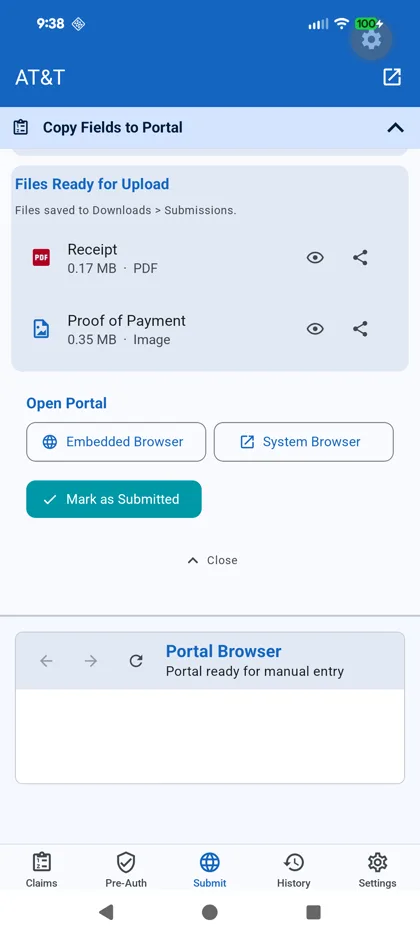
Claims list — Ready, High approval likelihood

Claims at a Glance
Every claim's status and approval likelihood in one list.

Claim detail with AI compliance flags

AI Compliance Review
Issues flagged before you open the portal.

Submission workspace — copyable portal category L1/L2/L3 fields

Workspace: Portal Fields
A highlighted button jumps directly to the prepared fields so they are easy to find and copy.

Submission workspace — files prepared for upload

Workspace: Upload Files
Friendly-named files are prepared for phone upload, email attachments, or an extracted desktop ZIP.

Simple, Transparent Pricing

Free for core features, with AI-powered compliance for power users.

Free Forever

$0

  • All non-AI features
  • On-device OCR & Scanning
  • Local PII Redaction
  • Manual Category Browsing
  • Organization & Storage

Trial

Free

  • Full AI access
  • First 3 claims & 3 pre-auths
  • Perfect for checking your first few submissions
Privacy First

Your documents never leave your device during OCR.

Text extraction runs entirely on-device using local machine learning — no photos are ever uploaded to a cloud server for reading. PII scanning (credit card numbers, SSNs, bank accounts) also runs locally before anything is sent anywhere.

  • On-device OCR — no receipt images sent to the cloud
  • Local PII detection before any data leaves your phone
  • Step Up opens only in your system browser — the app cannot access your login
  • Documents stored locally in your device's secure file system
  • AI analysis uses extracted document text after your local privacy review, not your images
Read Full Privacy Policy

Independent Tool. SunshineClaimBuddy is not affiliated with, endorsed by, or connected in any way to Step Up For Students, the Florida Department of Education, or any government agency. AI outputs are informational only and do not constitute legal or financial advice. Claim approval decisions are made solely by SUFS.

Frequently Asked Questions

What does the end-to-end claim submission flow look like?

Scan or share your receipt, invoice, and proof-of-payment into the app. On-device OCR extracts the text locally — no receipt images are sent to any server for OCR. A local PII scan flags sensitive patterns so you can review or permanently redact them. With your consent, AI analyzes extracted text from the claim and flags possible compliance issues, missing details, date mismatches, and category concerns using bundled reference guidance. You get a 3-level portal category suggestion with reasoning, a draft justification, and an approval-likelihood estimate. The Submit workspace prepares friendly-named upload files and shows a highlighted shortcut to every copyable portal field. You can open Step Up only in your normal browser or send an email/ZIP package to a computer.

How does the pre-authorization feature work?

Open the Pre-Auth tab, type a product name or paste a URL into the built-in browser, and navigate to a supported public product or service page. Tap "Pre-Auth This Item" and the AI reads available page content, extracts likely item details, suggests an FES-UA or FES-EO portal category, and drafts authorization text. Verify the category and draft against the current official rules before copying it into EMA.

Which Florida scholarship programs does this support?

SunshineClaimBuddy supports workflows for both the FES-UA (Unique Abilities) and FES-EO (Educational Options) scholarship programs using bundled reference guidance. Always verify current eligibility and documentation rules in the official program handbook.

Does the app submit claims automatically?

No. Step Up and EMA account pages open only in your device's normal browser. The app cannot access your credentials, portal pages, cookies, or session. It prepares upload files and copyable fields, while every sign-in, upload, review, and submission remains under your control.

Can I submit from a desktop computer?

Yes. Email a submission package to yourself with the English portal fields and each upload file attached separately, or export an unencrypted ZIP. The app warns before handing personal or financial information to your chosen email or storage provider. Extract the ZIP and upload the individual files — never the ZIP itself. Creating or emailing a package does not mean the claim was submitted.

How are the upload files prepared on my phone?

When you select a ready claim or pre-authorization, the app prepares friendly-named copies and checks each file against the 4 MB portal limit. On Android, choose a dedicated folder the first time; later preparations can reuse it, and the app replaces only files it created. On iPhone, use one bulk “Save Upload Files to Files” action before opening Step Up. If preparation is incomplete, the Step Up button warns you and offers Retry or Continue Without Prepared Files. Email and ZIP export remain available even if Android folder access is declined.

Where do I find the fields to copy into Step Up?

At the top of every active Submit workspace, a highlighted card shows how many portal fields are ready. Tap “View Portal Fields” to jump directly to the complete copyable list below the phone and desktop options.

How accurate is the AI compliance check?

The AI compares extracted document text with bundled FES reference guidance and can flag possible issues, but it can miss facts or interpret them incorrectly. Program rules also change. Always cross-check the current official online handbook before submitting; bundled reference material may not reflect the latest revision.

Is my children's data safe?

Yes. OCR runs entirely on-device — no receipt images are uploaded for text extraction. Student profile data (name, EMA ID) is stored in your device's secure storage. AI analysis sends only extracted text (not images) through an encrypted proxy server. See our Privacy Policy for details.

What does the subscription include?

Free features include document scanning and storage. The subscription unlocks AI-powered compliance review, category suggestions, approval-likelihood estimates, and appeal drafting. Current listed pricing is $5.99 per month or $59.99 per year; the App Store or Google Play checkout price controls if it differs.

When is the app available?

SunshineClaimBuddy is available now on both the App Store and Google Play.
Download SunshineClaimBuddy today.

SunshineClaimBuddy is now available on both the App Store and Google Play.
Choose your store and install on your phone today.